
Points & modifiers
Set up the rules that award — and deduct — points for driving and events, boost them with modifiers, and keep the economy healthy with caps and decay.
How points work
Points are your Hub's activity currency. Rules turn things drivers do — completing a delivery, attending a convoy — into points, and can take them away again for things you'd rather they didn't — speeding, crashing, skipping an event they signed up for; modifiers boost awards during campaigns; caps and decay keep the totals meaningful. Every change lands in an append-only ledger, so a driver's history is always explainable and nothing is ever double-counted: the same delivery or roll-call can only award each rule once, even if it's processed twice.
Points rules, Points modifiers and the Points ledger live in the Hub panel's
Engagement group; Points settings sits under Settings, in the Modules section.
Editing rules, modifiers, caps and settings needs the
points.manage_rules permission; viewing the ledger needs points.view; awarding by hand needs
points.award.
Changing a rule only affects future awards — points already in the ledger are never rewritten.
The rules every Hub starts with
Three fully editable rules are created with your Hub. Retune, rename, deactivate or delete any of them:
| Rule | Trigger | Award |
|---|---|---|
| Attend an event | Event attendance | 50 points |
| Distance driven | Distance driven (Trucky) | 1 point per 100 km, rounded down |
| Complete a delivery | Delivery completed (Trucky) | 5 points |
The Trucky triggers need your Hub linked to Trucky — see /integrations/trucky. Attendance points are awarded when staff mark a driver present at roll-call, not when they RSVP — see /admin/events.
Create or edit a rule
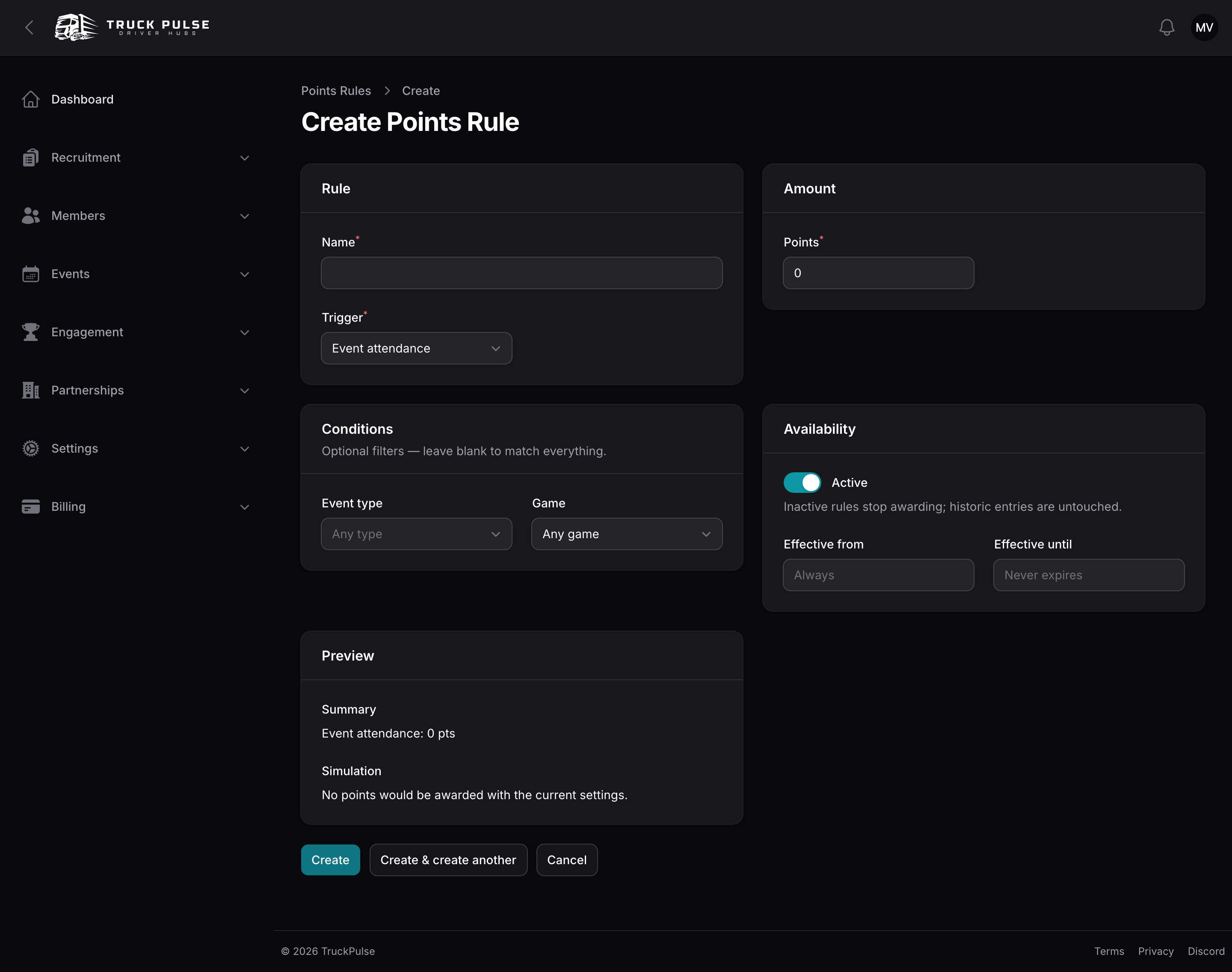
On Points rules, create a rule and work through the sections:
- Rule — the Name and the Trigger: Event attendance, Distance driven (Trucky), Delivery completed (Trucky), Clean delivery (Trucky), Driving score reached (Trucky), Convoy participation (CCSupervisor), Driving incident (Trucky), Event no-show, Manual award or Custom trigger.
- Amount — the Direction (Award points or Deduct points, see Penalties) and the Points for a flat amount. Only the distance trigger can switch Amount type to Per unit, where you set Points per unit, the Unit size (km) and the Rounding (Round down, Round up, Round to nearest).
- Conditions — optional filters; leave blank to match everything. Depending on the trigger: Event type, Behaviour, Free incidents per delivery, Minimum km per job, Minimum driving score (0–100), Game.
- Availability — the Active toggle and an optional Effective from / Effective until window, handy for seasonal rules.
The Preview section keeps you honest: a plain-language summary plus a live simulation ("A 750 km delivery would earn 7 pts") computed by the same engine that will do the real awarding.
Custom triggers
A Custom trigger rule is one your Hub invents — "Screenshot contest winner", "Convoy control volunteer" — with a flat amount. It never fires on its own; staff award it from the rules table with Award to members, and every award stays traceable to the rule. Set its direction to Deduct points and it becomes a penalty you hand out the same way — "Rule violation: −50" — with the action reading Deduct from members.
Penalties
Any rule can take points away instead of awarding them: set its Direction to Deduct points. Two triggers exist only for that, and are always deductions:
- Driving incident (Trucky) — charges a delivery per behaviour incident the driving score recorded. Pick the Behaviour (Speeding, Collisions, Harsh braking, Harsh acceleration, Fines, Damage, Fatigue) or leave it blank to count every kind, and set Points per incident. Free incidents per delivery forgives the first few — useful for speeding, where trackers report every burst over the limit. Like the other driving triggers, it only fires once your Hub has turned on Let driving score feed points (see Driving score and points).
- Event no-show — charges a driver who RSVP'd going but wasn't marked present by the time the roll-call locked (see /admin/events). Filter it by Event type or Game to charge only for, say, convoys. Roll-calls that were never taken — not a single driver marked present — charge nobody, so events where you don't take attendance are safe.
How deductions behave:
- No modifiers, no caps. Multipliers and flat bonuses only boost awards, and caps only limit earnings — a double-points weekend doesn't double a speeding penalty, and a penalty never frees room under a cap to earn more.
- Never below zero, by default. A penalty only deducts what the driver has left; the ledger shows what was actually deducted and how much was waived. Turn on Allow penalties to take a balance below zero in Points settings to charge in full.
- Balance, not lifetime. Penalties lower a driver's balance, leaderboard and competition totals, but never their lifetime earned — so a lifetime-based rank ladder isn't affected. Rank on balance (see /admin/ranks) if you want penalties to count against promotions.
- Once per source. A delivery or an RSVP is only ever charged once by each rule, however many times it's processed.
- Drivers on leave are excused from no-show penalties when they had an approved leave that day — turn off Excuse no-shows for members on leave in Points settings to charge them anyway.
Worked example: a speeding penalty
A rule charges 5 points per incident for Speeding, with 2 free incidents per delivery. A driver finishes a delivery with four speeding events and a collision:
- Speeding incidents past the allowance: 4 − 2 = 2; 2 × 5 = −10 points.
- The collision doesn't count — the rule only looks at speeding.
With 6 points left in their balance and negative balances off, the driver loses 6 points and the ledger notes the other 4 were waived.
Worked example: a delivery
A driver completes a 620 km Trucky delivery, with the default rules and no modifiers active:
- Distance driven — 620 km ÷ 100 km per unit = 6.2 units, rounded down to 6; 6 × 1 point = 6 points.
- Complete a delivery — a flat 5 points.
Two ledger entries are written against that one job, so the driver earns 11 points in total. If the same delivery were somehow reported again, neither rule would award a second time.
Modifiers
Modifiers are your campaign tool: a Multiplier scales matching awards ("2× points this weekend"), a Flat bonus adds a fixed number of points on top. Create them on Points modifiers:
- Modifier — the Name, the Type, and the Value (e.g. 2 for 2×, or the bonus points).
- Applies to — the Scope: All rules, Specific rules, or Trigger types (e.g. every attendance rule).
- Window — when it's live. Fixed dates runs between Starts at and Ends at; Recurring weekly repeats on chosen Days of week between two times of day, in your Hub's timezone ("double points every Friday and Saturday evening").
- Availability — the Active toggle.
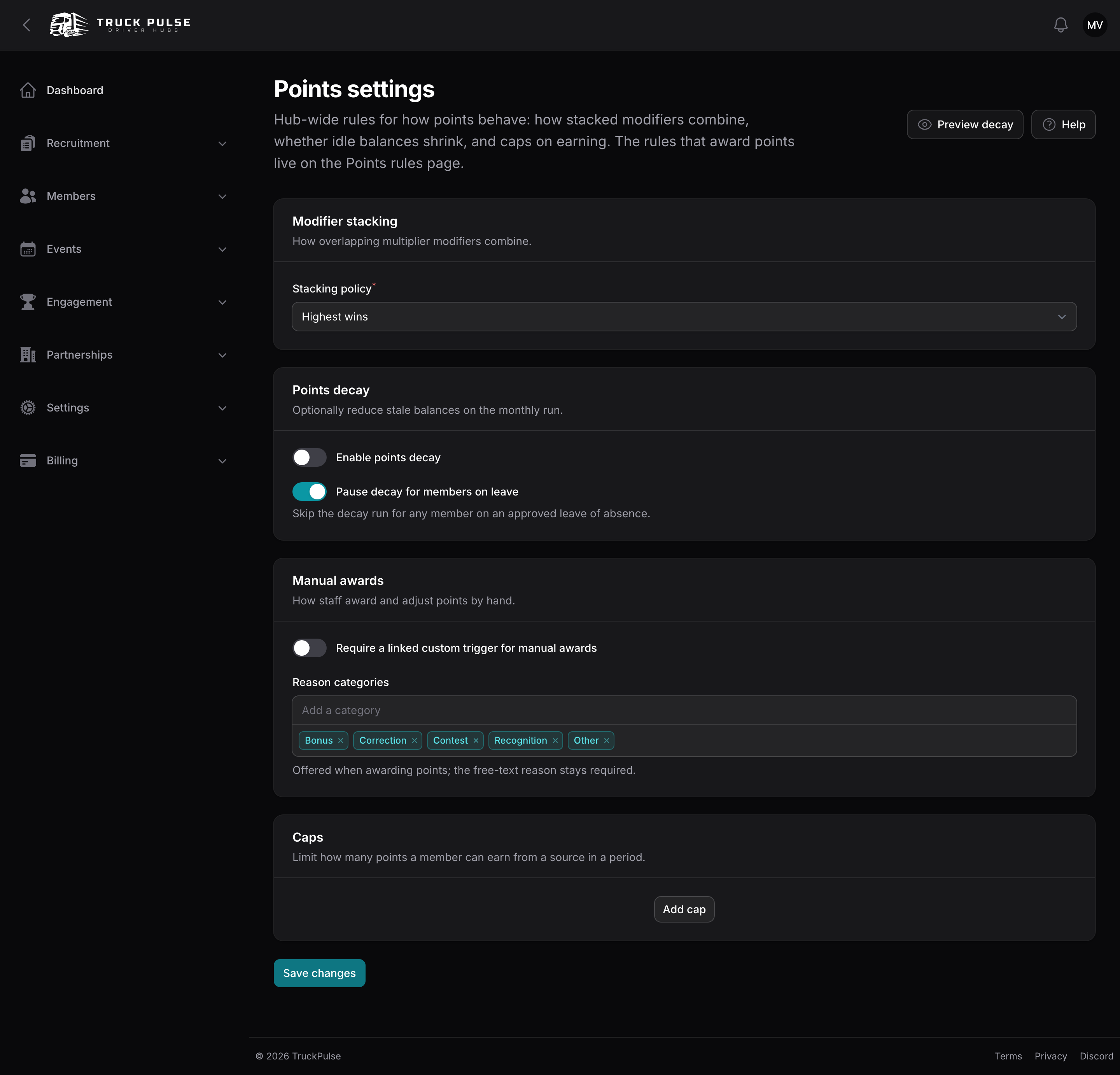
When several multipliers overlap, the Modifier stacking policy in Points settings decides the outcome: Highest wins (the default) applies only the single largest multiplier, so campaigns never compound; Stack multiplicatively multiplies them together. Flat bonuses always add on, whatever the policy. The final amount is the base times the effective multiplier (rounded to the nearest point), plus the bonuses.
Worked example: a convoy during a double-points weekend
Your Hub runs a "Double points weekend" (a 2× multiplier on all rules) that happens to overlap a "Convoy season" 1.5× multiplier. A driver is marked present at a convoy:
- Base award: Attend an event = 50 points.
- With the default Highest wins stacking, only the 2× applies: 50 × 2.0 = 100 points.
- Had you set Stack multiplicatively, the factors combine: 50 × (2.0 × 1.5) = 150 points.
The ledger entry stores the full breakdown — base, which modifiers applied, and the effective multiplier — so you can always answer "why did this award 100?".
Caps
Caps put a per-driver ceiling on earnings so a marathon session can't run away with the leaderboard. They live on the Points settings page under Caps — use Add cap and set:
- Name — e.g. "Daily driving cap".
- Source — what it limits: Trucky job, Event attendance, Manual award, or leave it as All sources.
- Period — Per day, Per week or Per month, rolling over at your Hub's local midnight.
- Max points — the ceiling, and an Active toggle.
At award time the engine sums what the driver already earned from that source in the current period and trims the new award to fit; anything over the ceiling is simply dropped (and recorded in the entry's breakdown).
Decay
Optionally, idle balances shrink over time so ranks reflect who's active. On Points settings under Points decay:
| Setting | Default | What it does |
|---|---|---|
| Enable points decay | Off | Turns the monthly decay run on |
| Decay mode | Percentage of balance | Or Expire old entries |
| Decay per run (%) | 2 | Percentage mode: each run removes this share of the balance, rounded down |
| Expire entries older than (months) | 12 | Expire mode: points earned longer ago than this lapse |
| Pause decay for members on leave | On | Skips drivers on an approved leave of absence — see /admin/loas |
Two more switches on the same page, under Penalties, shape the rules that deduct points:
| Setting | Default | What it does |
|---|---|---|
| Allow penalties to take a balance below zero | Off | Off: a penalty only deducts what the driver has left. Manual corrections always apply in full |
| Excuse no-shows for members on leave | On | Skips the no-show penalty for drivers on an approved leave on the day of the event |
Decay runs once a month and writes negative Decay entries to the ledger — history is never rewritten, and a balance can't go below zero. For example, with the default 2% a driver holding 1,250 points loses 25 on the next run.
Before you commit, use the Preview decay button at the top of the page: it evaluates the values currently in the form — even unsaved ones — and tells you exactly how many members would lose how many points.
Manual awards and corrections
The Points ledger page is the Hub-wide feed of every entry — filter by member to see one driver's
history. Its two header actions (permission points.award) are how staff move points by hand:
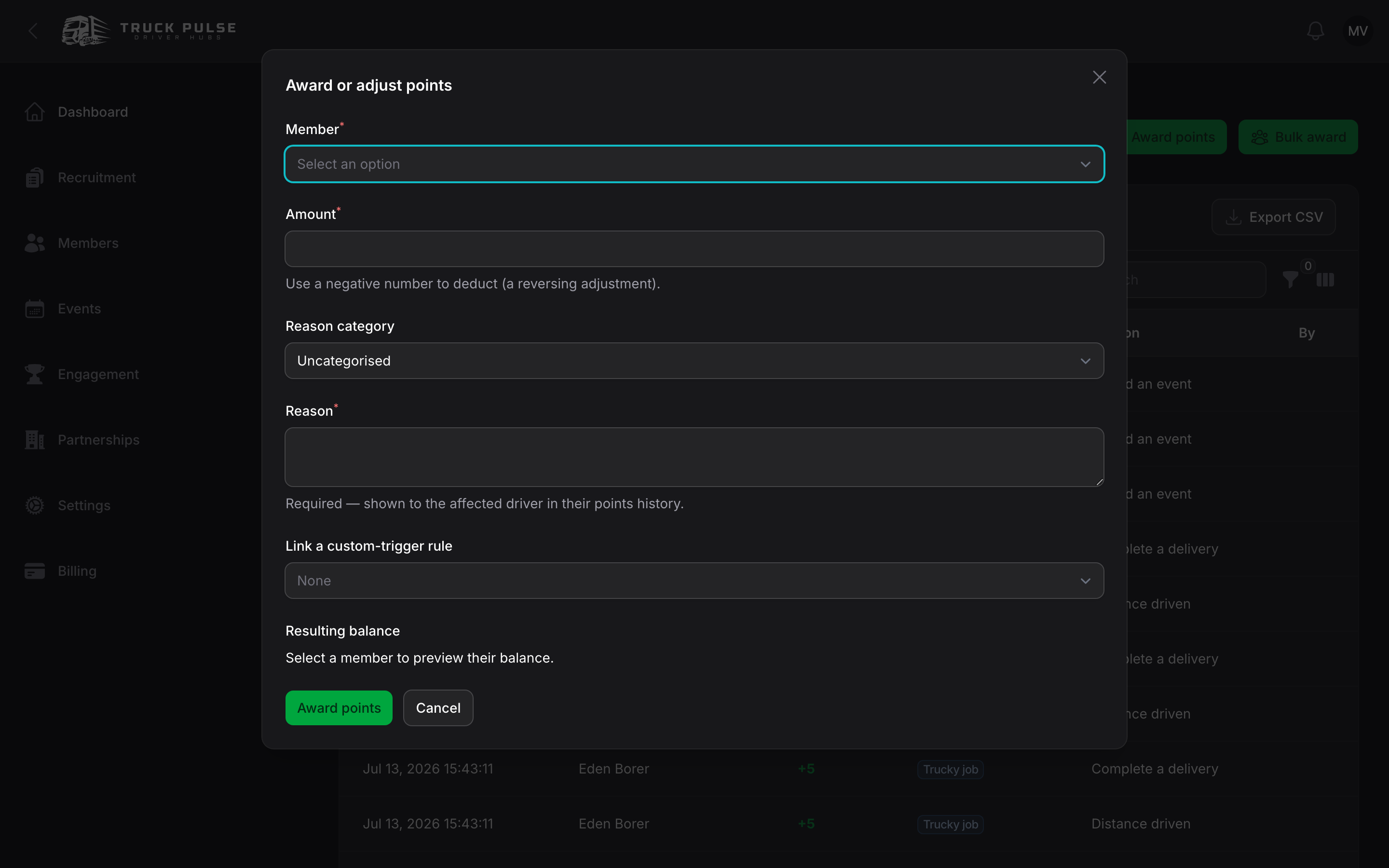
- Award points — pick a Member, an Amount (negative to deduct), an optional Reason category, and a required Reason the driver will see in their history. A live Resulting balance preview shows the balance move before you confirm.
- Bulk award — the same, to many people at once: hand-picked members, or every confirmed attendee of an event. Bulk awards run in the background and you're notified when they finish; the event variant is safe to re-submit — nobody is credited twice.
If the bot is in your Discord server, staff can also award from there with
/points award — see slash commands.
Two knobs on Points settings shape this, under Manual awards: Reason categories (the default list is Bonus, Correction, Contest, Recognition, Other) and Require a linked custom trigger for manual awards (off by default) — turn it on and every positive hand-award must reference a custom-trigger rule, which keeps ad-hoc awards accountable. Corrections (negative amounts) are always exempt.
Driving score and points
If your Hub scores driving behaviour on Trucky deliveries, you can pay points for quality, not just distance. It's opt-in: on the driving score page, turn on Let driving score feed points (see /integrations/trucky). Then three triggers come alive:
- Clean delivery (Trucky) — a flat award whenever a delivery comes in clean under your Hub's clean-delivery threshold.
- Driving score reached (Trucky) — a flat award gated by the rule's Minimum driving score condition, so you can reward "scored 90 or better".
- Driving incident (Trucky) — a penalty per speeding event, collision or other incident (see Penalties).
Neither default rule exists for these — create them yourself when you're ready.
What drivers see
Drivers follow their own balance on My points in the driver panel — every entry with its reason — and on the dashboard widgets. Points feed rank thresholds (see /admin/ranks) and competitions.
Related guides
- /admin/ranks — turn points into a ladder drivers climb
- /admin/loas — approved leave can pause decay
- /admin/events — attendance is a points source
- /integrations/trucky — the delivery data behind the driving triggers